
AI Image Watermark & Text Remover
AI video text and image watermark removal · Selected-area or full-frame processing · Batch uploads
For signed-in users, each successfully processed image costs 10 credits. Failed image tasks are not charged.
Before & After
Remove text and watermarks.
Illustration with added text and graphics, not an actual processing result.

Key Features
AI Image Eraser
AI fills text and watermark areas using the surrounding image. It cannot recover hidden original pixels; inspect the result.
Up to 20 images
Select up to 20 images. Each image has its own task and download result.
File handling
Image files are available temporarily for 24 hours. Save completed results to your device.
Pay As You Go Credits
Each successful image costs 10 credits for signed-in users; failed image tasks are not charged.
One recorded image-processing example
Processed through the 550W Figma plugin on October 6, 2026: a 1000 × 558 image, one successful task, 10 credits. These are the original file and downloaded output, without additional retouching.
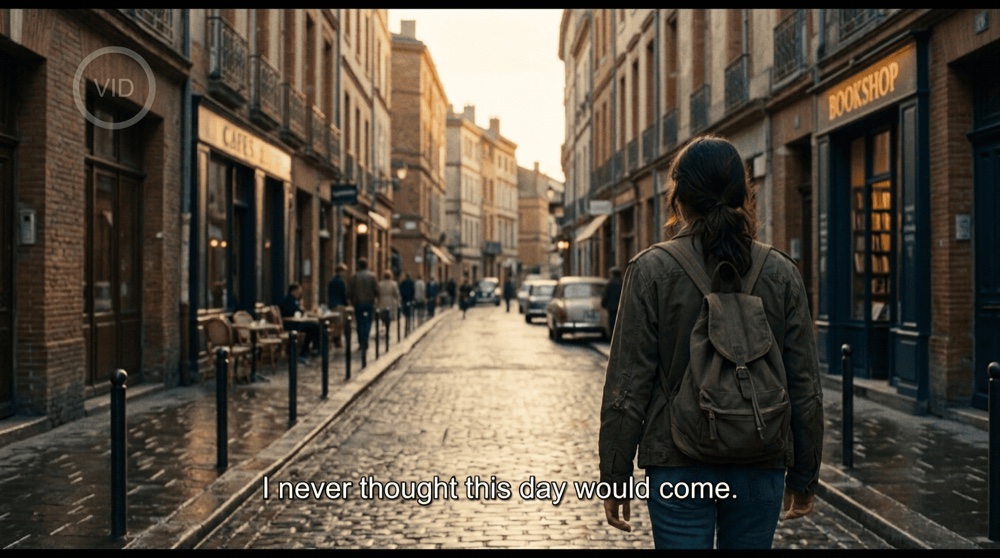
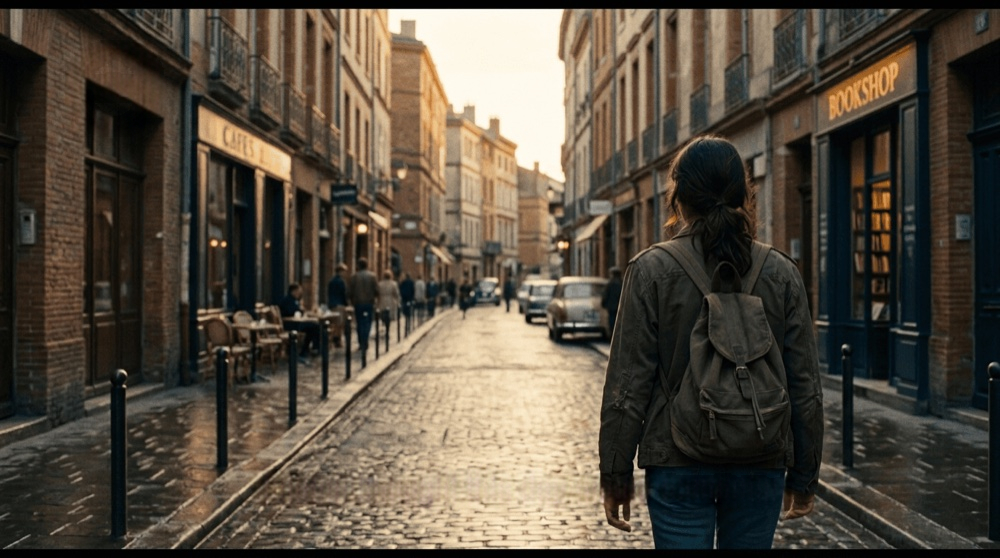
This single still-image example does not demonstrate video consistency or guarantee the same result for faces, detailed textures or larger covered areas.
Image Eraser — Frequently Asked Questions
How do I remove hardcoded subtitles from a video without leaving a watermark?
First check whether the subtitles can be disabled in your player. For burned-in text, upload an MP4 or MOV, select the subtitle area or fullscreen mode, review the credit estimate, and submit. Preview the completed video before downloading.
How can I remove a watermark or logo from my video?
Upload the video and select the area containing the logo or watermark. Standard processes inside your selection; Protect keeps the selection and processes outside it. Check the whole clip if the mark moves.
What is the best AI tool for removing subtitles and watermarks from video?
Compare tools using a short sample of your own footage. Check moving backgrounds, faces, fine detail, supported file limits, and the total processing cost. A clean still frame alone does not show whether the video repair stays consistent.
What video formats does 550W Watermark & Text Eraser support?
Upload MP4 or MOV up to 1080p and 30 minutes. Signed-in uploads allow up to 1 GiB per file. Guest files up to 3 minutes allow 300 MiB; longer guest files allow 1 GiB. The free guest preview processes only the first 10 seconds.
How fast is the video processing with 550W Watermark & Text Eraser?
Processing time varies with the video, selected area, and service load. Follow the task status and return to the task list for the result; there is no fixed completion time.
Can I process multiple videos at once with batch processing?
Select multiple videos or a folder, then mark each video. You can apply a selection to other videos with the same resolution. Each video is an independent task; review its estimate and result separately.
How does the pricing and credit system work?
You can try one image or a 10-second video preview as a guest. Sign in to continue. Signed-in image processing costs 10 credits per successful image; video processing shows a credit estimate before submission. Buying credits and submitting a task are separate actions.
What is the output quality after subtitle or watermark removal?
AI reconstructs the covered area using surrounding visual information. Simple backgrounds are generally easier than moving faces or detailed textures. Review the full clip for flicker and softened detail; hidden original pixels cannot be recovered exactly.
What image formats and limits are supported?
JPG, PNG, BMP, WebP, AVIF, TIFF, and SVG are supported up to 50 MiB each. Select up to 20 images per batch; successful results are delivered as JPG.
How is image removal billed?
For signed-in users, each successfully processed image costs 10 credits. Failed image tasks are not charged. Guests can try one image before signing in.
Which images produce the best removal results?
Small marks over simple backgrounds are a better starting point than large opaque text over faces or fine detail. Compare the repaired area with the original before using the image.
What happens with one image versus multiple images?
A single image normally returns an interactive before-and-after comparison. If it exceeds the wait time, processing continues in Recent Image Tasks. Multiple images always use the task list.
How long are uploaded images and results kept?
Image files are available temporarily for 24 hours. Download completed results promptly and keep your original.